
How to Create a Flipbook for free: Two Simple Ways to Turn a PDF into an Interactive Publication
If you already have a PDF and want to turn it into a page-flipping digital publication, you can choose between two approaches: use desktop software or work directly online in your browser. In this guide, we’ll look at both options and the essential steps to create a modern flipbook that is easy to browse and ready to share.
Choose the Solution That Fits You Best
Would you rather work on your computer or create everything directly online?
MyFlipbook
Ideal if you prefer working on your PC or Mac, managing projects locally, and exporting the flipbook to publish on your website.
FlipbookPRO Online Studio
A convenient choice if you want to work directly in your browser, without installing software, and create your flipbook in a complete online environment.
prepare your PDF, choose MyFlipbook if you want desktop software or FlipbookPRO Studio if you prefer to work online, import your document, customize the viewer, and publish the result.
In this guide
- What a flipbook is
- When it is more useful than a traditional PDF
- How to choose between desktop software and an online Studio
- How to create a flipbook step by step
- How to get a more professional result
What a flipbook is?
A flipbook is a digital publication that recreates the experience of turning the pages of a magazine, brochure, catalog, or book. Instead of opening a standard PDF, readers use an interactive viewer designed for easier online browsing.
It is a useful solution for business catalogs, brochures, portfolios, magazines, price lists, manuals, presentations, and promotional documents. Depending on the tool you use, a flipbook can also include clickable links, multimedia content, search, and full-screen viewing.
Why Use a Flipbook Instead of Sharing Just a PDF?
MyFlipbook or FlipbookPRO Studio: Which One Should You Choose?
Both solutions have the same goal: turning a document into a flipbook that is easier to browse and share. The main difference is how you prefer to work.
| Need | MyFlipbook | FlipbookPRO Studio |
|---|---|---|
| How You Use It | Software for Windows and Mac | Directly online |
| Installation | Yes | No |
| Best For | People who prefer working locally | People who prefer working in a browser |
| Access | myflipbook.net | flipbookpro.net |
How to Create a Flipbook: Step by Step
1. Prepare Your PDF
Make sure the text and images are clear and that the pages already have a well-organized layout. The quality of the original PDF directly affects the final result.
2. Choose How You Want to Work
Se preferisci un programma installato sul computer, usa MyFlipbook. Se invece vuoi lavorare direttamente dal browser, apri FlipbookPRO Online Studio.
3. Import Your Document
Select your PDF and start the import. The pages will be converted into the content of your flipbook.

4. Customize the Viewer
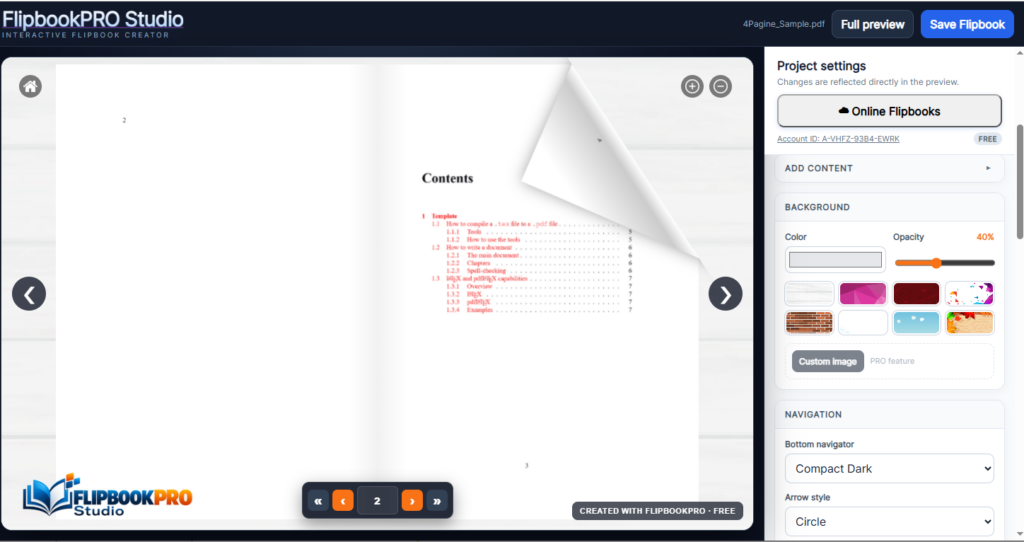
Adjust the background, logo, colors, and other available options. The goal is to make the flipbook consistent with your website, brand, or type of publication.
5. Review and Publish
Before publishing, test the navigation, check any links, and review the result on a smaller screen as well. Then export or publish the flipbook using the options provided by your chosen tool.
When to Choose MyFlipbook
MyFlipbook is especially suitable for users who prefer desktop software and want to manage their work directly from their computer. It is designed to convert PDFs into interactive flipbooks with a simple workflow.
- Software for Windows and Mac
- Easy PDF importing
- Interactive flipbook viewer
- Visual customization and branding
- Export for publishing on your own website
- Suitable for brochures, catalogs, magazines, and portfolios
- Also available with a one-time paid license: no automatic subscription
Quando scegliere FlipbookPRO Online Studio
FlipbookPRO Studio is the online alternative for users who prefer to create and edit their flipbook directly in a browser. You do not need to install software on your computer: you can access the Studio, work on your project, and manage online publishing.
It is especially convenient if you want a more complete online workspace and prefer to manage your project without being tied to a single computer.
5 Tips for a More Professional Flipbook
- Start with a good PDF: sharp images and readable text make a real difference.
- Do not overcrowd your pages: leave enough space between text, images, and calls to action.
- Use links wisely: connect products, contact pages, and useful resources.
- Keep your branding consistent: use your logo, colors, and background consistently.
- Always do a final test: check the flipbook on both desktop and mobile.
Frequently Asked Questions
Ready to Create Your Flipbook?
Choose the method you prefer: desktop software or an online Studio.